Preparing the Impressions Slides
Impressions are employee recognition messages submitted by staff to acknowledge and celebrate one another for a job well done.
Receiving the Report
HR manages Impressions through Paylocity.
At the end of each month, HR sends the Impressions Report to the Columbus Office Coordinator.
Adding to the Presentation
The PowerPoint will have slides ready for the impressions to be added.
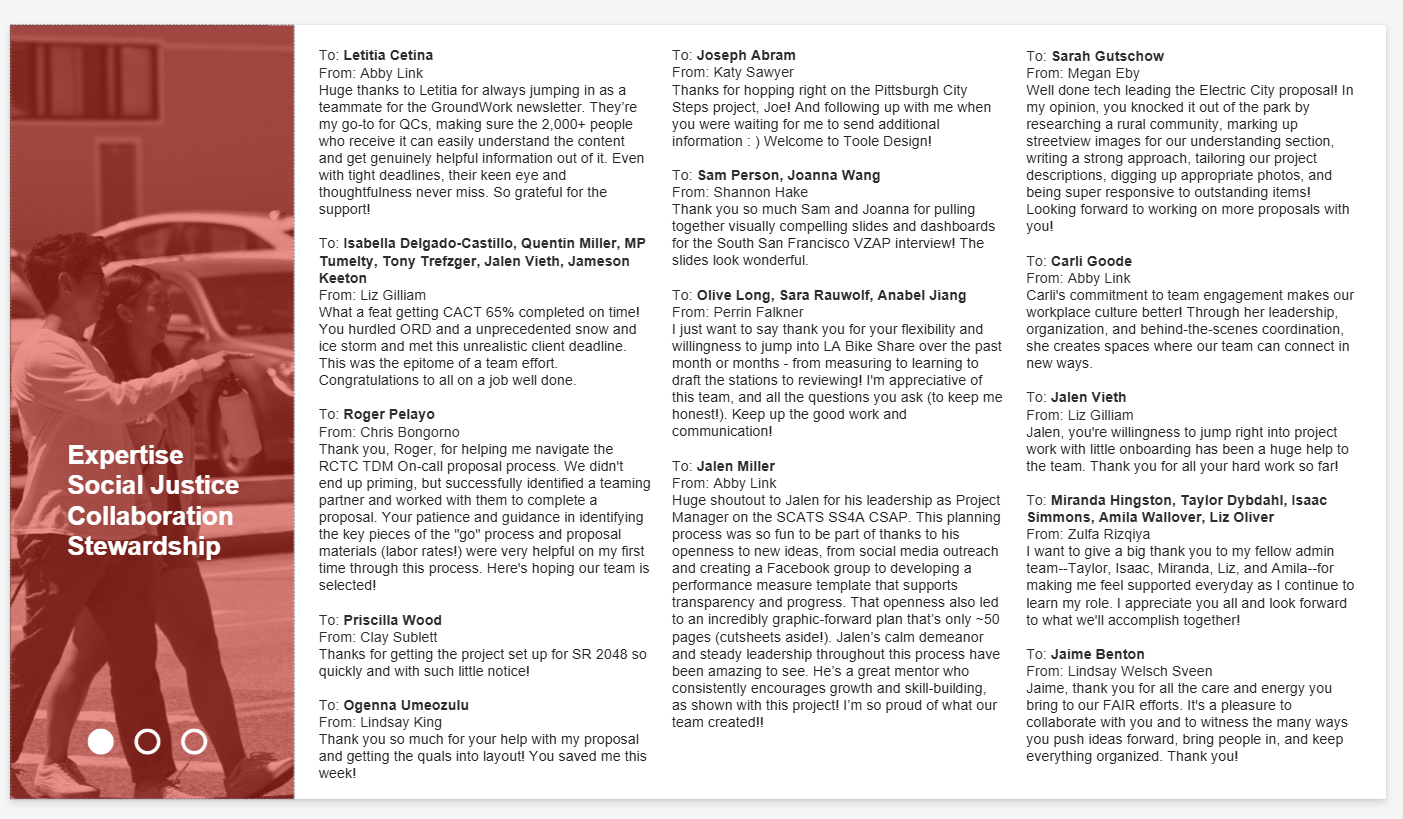
Format each slide according to the established template.
Be sure that the page indicators are properly placed and edited (the black circles in the bottom-left corner of the slide)
If there are more Impressions than can comfortably fit on a single slide, create additional slides as needed while maintaining consistent formatting.
During the All-Staff Meeting
The Impressions presentation should be set to play on a continuous loop before the All-Staff Meeting begins so attendees can view the recognitions as they join.
Meeting Notes
The Impressions section of the meeting notes can be copied directly from the PowerPoint slides.
Reformat the content as needed to match the style and formatting of the meeting notes before publishing.
Example of slide: